
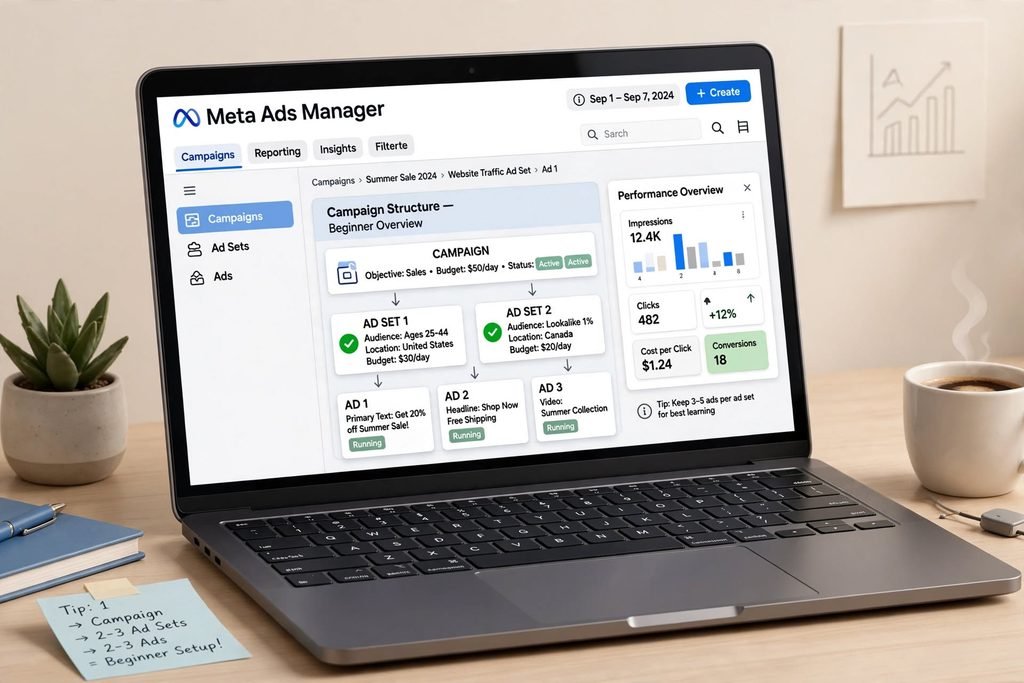
If you have a business in India in 2026, your customers are spending 2-3 hours a day on Facebook and Instagram. Meta Ads is how you reach them at the right time, with the right message, and turn scrolling into sales.
This is your no-jargon, beginner-friendly guide.
1. What Are Meta Ads?
Meta Ads are paid ads that run across Facebook, Instagram, Messenger, and Audience Network. You create them in one place — Meta Ads Manager — and Meta shows them to people most likely to take your desired action.
Unlike boosting a post, Ads Manager gives you full control: objective, audience, budget, placement, and creative testing.
Why Meta Ads work for small businesses:
- You can start with just ₹200-500 per day
- You can target by city (e.g., Delhi, Mumbai), age, interests, and behavior
- You can retarget people who visited your Instagram or website
- You can track every result — clicks, WhatsApp chats, purchases, leads
2. The Structure You MUST Understand: Campaign > Ad Set > Ad
Think of it like a tree. This is the foundation — get this wrong and your ads won’t perform.
Campaign (The WHY): What is your goal?
- Awareness: Show your brand to more people
- Traffic: Get clicks to your website or Instagram profile
- Engagement: Get more likes, comments, saves
- Leads: Collect phone numbers via Instant Forms or WhatsApp
- Sales: Get purchases, Add to Cart, Checkout — needs Meta Pixel
Beginner Tip: If you sell products like candles, soaps, or fashion, always start with Sales or Leads objective. Don’t waste money on Awareness at first.
Ad Set (The WHO & How Much): This is where you define:
- Audience: Location (Delhi +10km), Age (22-45), Interests (Handmade, Organic, Sustainable Living, Small Business)
- Placement: Start with Advantage+ Placements — let Meta decide where your ad performs best
- Budget: Daily budget (₹500/day is good to start) or Lifetime budget. Keep it for at least 7 days to learn.
- Schedule: Run continuously for best results
Ad (The WHAT): Your actual creative — image, video, Reel, carousel, text, headline, button.
Golden Rule: 1 Campaign = 2-3 Ad Sets (different audiences) = 2-3 Ads per Ad Set (different creatives). That’s the ideal beginner setup.
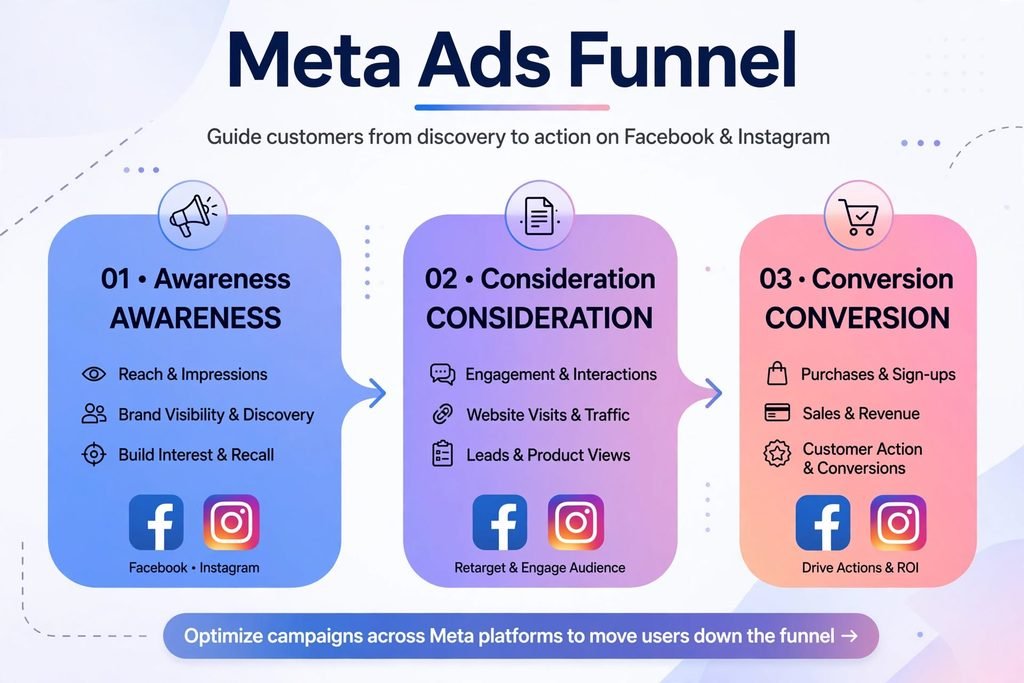
3. The Funnel: Don’t Sell to Strangers Immediately
Most beginners make one ad that says “BUY NOW” to everyone. That fails.
You need a funnel:
Top of Funnel (Awareness): Show who you are. Video of your story, how products are made. Goal: Reach.
Middle of Funnel (Consideration): People who watched your video or visited your profile. Show them testimonials, benefits, UGC. Goal: Traffic / Engagement.
Bottom of Funnel (Conversion): People who added to cart or DMed you but didn’t buy. Show them offer + free shipping + COD. Goal: Sales / Leads.
Start with Bottom and Middle first if budget is low — these people already know you.
4. Step-by-Step: Launch Your First Ad in 20 Minutes
Step 1: Setup
- Create a Business Portfolio at business.facebook.com
- Connect your Instagram @glossgrain9 and Facebook Page
- Add a payment method (UPI, card)
Step 2: Create Campaign
Ads Manager > + Create > Choose Objective: Leads (for WhatsApp) or Sales > Name your campaign > Advantage Campaign Budget OFF for beginners.
Step 3: Create Ad Set
- Conversion Location: WhatsApp or Website
- Audience: Location: Delhi, Age: 20-40, Detailed Targeting: Include “Handmade soaps, Candles, Gifting”
- Budget: ₹500 daily
- Placements: Advantage+
Step 4: Create Ad
- Use a vertical 9:16 video/Reel — it gets 40% more reach. Show product in use.
- Primary Text: Hook in first line. Ex: “Tired of chemical soaps that dry your skin? Our handmade besan & rose soap…”
- Headline: “Free Delivery in Delhi Today”
- Call to Action: “Send WhatsApp Message” or “Shop Now”
- Add 2-3 variations of the same video with different first 3 seconds.
Publish and wait. Don’t touch it for 48 hours.
5. Creative is King in 2026
Meta’s AI does the targeting, you do the creative. Good creatives lower your cost by 50%.
What works now:
- UGC-style Reels: Shot on phone, no studio polish, real voiceover
- Problem -> Solution: Show the problem in 2 seconds, your product as the solution
- Text on Video: 85% watch without sound
- Carousel of Benefits: Slide 1: Product, Slide 2: Ingredient, Slide 3: Review
Avoid: Stock photos, too much text (over 20% on image), and logo-only images.
6. How to Read Results (Without Getting Confused)
Check Ads Manager after 3 days:
- CPM: Cost to show ad to 1000 people. In India, ₹80-250 is normal.
- CTR (Link Click-Through Rate): >1.5% is good. If low, your creative is weak.
- CPC: Cost per click. < ₹5-15 is good for most niches.
- Leads/Purchases & Cost Per Result: The only metric that matters. Are you getting leads under ₹100? Sales with 2x ROAS?
- Frequency: If it’s >3 in 7 days, your audience is too small — expand location or interest.
If CTR is low, change creative. If CTR is good but no sales, fix your website/WhatsApp reply speed/offer.
7. Common Beginner Mistakes to Avoid
- Boosting posts instead of using Ads Manager
- Changing budget/audience daily — resets learning phase
- Targeting too narrow (only 1 interest) or too broad (All India with no interest)
- Using one image for weeks — creative fatigue kills performance in 10-14 days
- Not installing Meta Pixel on website — you can’t retarget without it